Setting Up The SAP Fiscal Year Variant For New Implementations
Concept Of A Fiscal Year
Every business has to follow a certain accounting cycle in order to record the business transactions. Some businesses follow a January to December cycle while other businesses may follow an April to March cycle. The choice of the accounting year or the fiscal year depends on the business requirements. The fiscal year is usually a 12 month period over which all the business transactions are recorded. At the end of this period financial statements are prepared to review the performance of the business. These business requirements for the accounting year can be mapped into SAP by using a two alphabet identifier called the fiscal year variant.
A posting period is a period contained in the fiscal year over which transactions are recorded and clubbed together. Every transaction that is recorded in SAP has to be assigned to a posting period. Normally, every month is considered as a posting period which results in a total of 12 posting periods in a financial year. The special periods are meant for the year-end closing transactions. It provides flexibility to the accounting department to make adjustment entries while executing the year-end closing process.
The fiscal year variant can be used to define the following:
- Number of normal posting periods available in a financial year.
- Number of special posting periods available in a financial year.
- The duration of the accounting cycle i.e. a complete fiscal year or a shortened fiscal year.
- Whether the fiscal year is the same as the calendar year.
- Procedure to determine the current period while posting.
The fiscal year variant is defined at the client level and is therefore available to all the company codes in the client. If there is more than one company code which uses the same fiscal year configuration, then the configuration need not be defined again and again for each of the company codes. The settings can be defined one as once as a fiscal year variant and can then be assigned to multiple company codes. This saves time during new implementations and also reduces the errors that may happen due to repeated manual entry. The fiscal year variant is first defined and then it is assigned to the company codes for which it is to be used.
The fiscal year variant is one of the first configurations that is needed to be done while setting up the organizational structure in SAP. No transactions can be recorded without defining the fiscal year variant and assigning it to the company code. The fiscal year variant is used to define the normal and the special posting periods that are available for posting business transactions in a company code and the posting period variant is used to control which of these periods is open for posting.
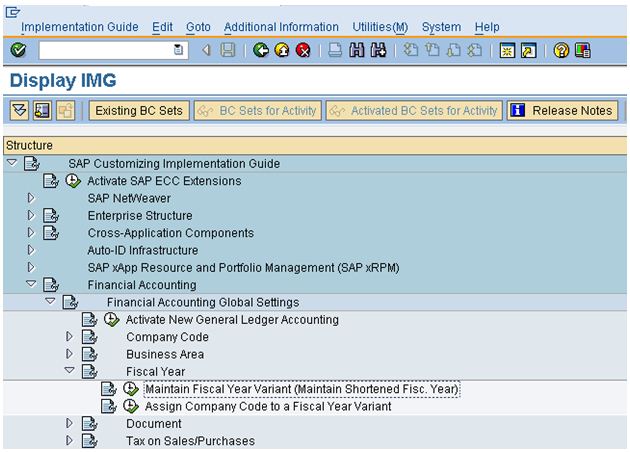
Navigate to the implementation guide menu as shown in the screenshot below or execute the transaction code OB29 from the SAP Easy access menu display the fiscal year variant configuration screen.