

Concept Of A Customer Master
All the data pertaining to a particular customer is stored in the customer master in SAP. This data is made available to other transactions and modules as and when required. The customer master contains the following data sets:
- GENERAL DATA:The general data consists of the customer address, country, contact person, etc.
- COMPANY CODE DATA: The company code data contains the data specific to a company code like the payment terms, payment methods, dunning procedures, etc.
- SALES DATA: The sales area data contains information like the sales organization, division, pricing, billing details, shipping details, etc.
The customer master is extremely important for the Sales and Distribution as well as the Financial Accounting module. The details of the customer such as the payment terms, address, sales area, division, paying bank, payment methods, etc. are picked up from the customer master and provided to the other modules as and when necessary.
The total data for a customer master is stored in multiple tables. The General data pertaining to a customer is stored in the KNA1 table while the company code data is stored in the KNB1 table. The sales data for a customer is stored in the KNVV table. All these tables are accessed for information about the customer by the FI and the S&D module.

Concept Of A Customer Account Group
A customer account group is used to group together customers by some criteria. For e.g. a business may have different account groups for international and domestic customers.

The customer account groups define the following features for every customer assigned to them:
- The customer number ranges are assigned to the customer account groups. Whenever a customer is created in SAP, it is assigned a unique number for its identification. The customer account number may be assigned manually by the end user or Incrementing numbers may automatically be assigned by SAP. This setting for manual or automatic assignment of customer numbers is defined in the customer account group. Besides, the customer account group also defines the range of number that can be assigned to a customer assigned to that account group.
- SAP provides a lot of fields into which data can be entered for every customer. Depending on the business requirements some of the field may be needed to be made mandatory while some fields may not be required at all. The field status is assigned to the customer account group. All the customer masters assigned to a particular customer account group follow the field status settings that are assigned to the customer account group. SAP allows any field to have four statuses as follows:
- → REQUIRED: A field which is set as required must be entered by the user while creating the customer master. All important fields for a business should be set as required so that they are not missed while creating a new customer master.
- → OPTIONAL: A field which is set as optional can hold data or it can be left blank by the user.
- → SUPPRESS: A field which is set as suppress is not displayed while creating the customer master. All fields which are unnecessary and are never to be used by a business should be set as suppress. However, care should be taken before setting the field status as suppress to ensure that it will not be used later. If there is a doubt, then it is better to leave the status as optional.
- → DISPLAY: A field with the display status is only displayed and cannot be modified by the end user.
- The account group also determines whether a particular customer is a one-time customer or not. This helps in differentiating one-time customers from regular customers. All these settings can be seen in the figure shown below.

Steps To Create A Customer Master
Customer masters can be created from scratch or they can be created by reference. It is a good SAP business practice to create a customer master by reference whenever possible. The data from the various fields in the reference customer is automatically copied to the new customer master being created. This saves time and also reduces the chances of entering erroneous data:
STEP 1: Navigate to the path shown below or execute the transaction code XD01 to create the customer master. Transaction code XD01 is for creating a customer master centrally and allows the general data, company code data and the sales data to be entered in one go.

STEP 2: Select the account group on the screen as shown below. Enter the other details as shown in the screenshot below. Leave the customer number blank if the account group is set to internal assignment i.e. automatic incremental numbering will be done for customers. Click the check button at the bottom of the dialog box.

STEP 3: The general data screen is displayed. It has 7 tabs as shown below viz. Address, Control Data, Payment Transactions, Marketing, Unloading Points, Export Data and Contact Person. Enter the data into the various fields on these tabs as shown below. Once the general data has been entered click on the company code button at the top of the screen to display the company code data tabs.

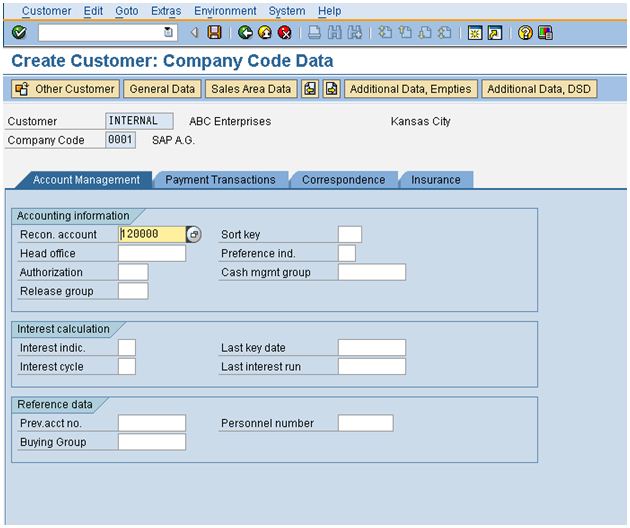
STEP 4: There company code data screen has 4 tabs viz. Account Management, Payment Transactions, Correspondence and Insurance as shown below. Enter the data into the various fields on the four tabs and click on the sales area data button at the top of the screen to display the sales area data screen.
STEP 5: The sales area data screen has 4 tabs viz. Sales, Shipping, Billing Documents and Partner Functions. Enter the data into the various fields on the four tabs and click on the save button to save the customer master.

STEP 6: A success message stating that the new customer has been created is displayed. SAP assigns the account number to the new customer automatically because internal assignment was activated for the customer account group.